Easy Tasks · v2.4.0
Scene organisation, mesh cleanup and modelling analysis — one keystroke away. Built for environment and prop work, for Blender 3.0 – 5.x.
Free and open source, GPL-3.0-or-later · No licence to buy, nothing held back
Blender's outliner will hold any structure you want. It just won't build it for you, and it won't keep it once you're three hours into blocking out a level. Easy Tasks does both — and while it's there, it checks your UVs, reads your silhouettes, and batches your assets out.
Watch it work
Blender Scene Organization Add-on — Easy Tasks · Plays on YouTube
What's inside
It's worth being straight about which is which. The first six below have no built-in equivalent — they're the reason to install it. The last three are Blender work you already do, in one step instead of six.
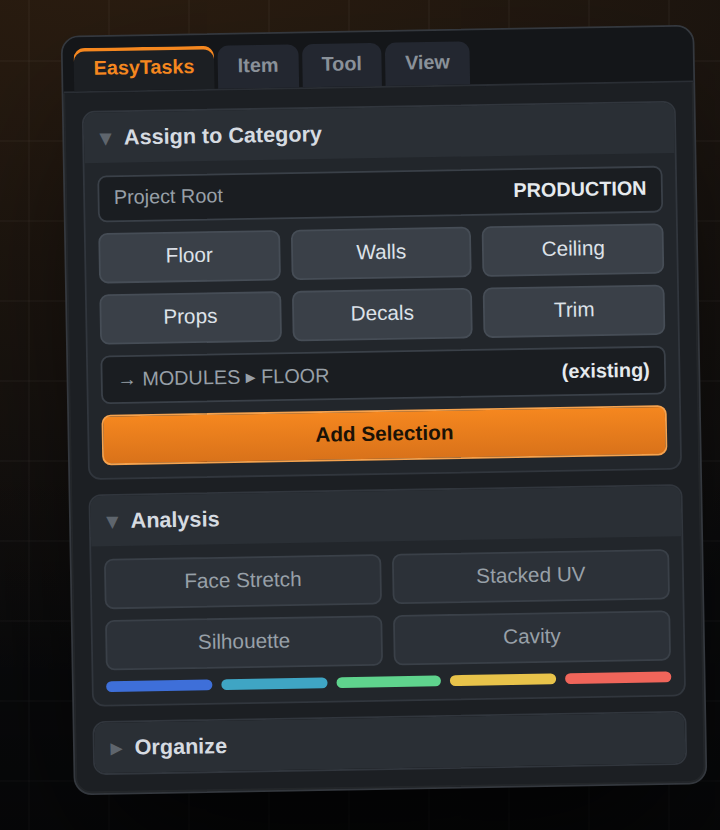
Select the floor meshes, click Floor. Point it at a project root and it uses the hierarchy you already have, instead of inventing one beside it.
Sorts every object into matching collections by type and name. Auto-route does it the moment you create something new.
In the viewport and the outliner. Suggests a destination, lists existing collections with object counts, searches past twenty.
Colour-codes UV distortion as vertex colours right in the viewport: blue compressed, green even, red stretched. Run it again to restore.
Finds and selects objects sharing an identical UV layout, so duplicated or stacked UVs surface before they reach a bake.
One click each, per-viewport, mutually exclusive — and they restore precisely the shading you had before.
Every selected object to its own FBX, OBJ or GLB, with optional prefix/suffix renaming and transform apply.
Build a PRODUCTION ▸ STUDIO / MODULES / BLOCKING tree, and generate Decimate-reduced LOD copies in one step.
Consolidate materials, clean up loose geometry, origin to base, and push collection colour tags down onto object viewport colours.
Not in the grid, but in the add-on: Visibility Bookmarks — snapshot which collections are visible under a name, then restore that state later. It's the eighth of the distinctive tools; it just didn't fit the nine-card layout.
Batch work
Mat.001 / Mat.002 back into Mat.snapshots/.Shortcuts
Beyond those, there's one-key access to things Blender already does — modifiers, UV seams and sharp edges, asset marking, link/transfer data, origin modes, interaction modes, apply transform, shading, select by type, and isolate / swap / select / rename by collection.
Install
Install the zip, not the source folder. Blender takes the module name from the folder inside the archive, and the add-on's preferences are keyed to it.
Built for large scenes
Measured on a 160k-polygon mesh and a 1,200-object scene.
The auto-route handler used to rebuild a full set of scene object names on every depsgraph update. It now gates on an integer comparison, so its idle cost doesn't scale with scene size.
Use it, modify it, ship commercial work with it — there's no licence to buy and nothing held back for a paid tier. The source is on GitHub. If it saves you time and you'd like to support the work, everything else I make is at 3dartstuff.com.
Questions
Blender 3.0 through 5.x. It's a single Python module — EasyTasks/__init__.py — with no external packages to install.
In Blender, open Edit ▸ Preferences ▸ Add-ons ▸ Install…, pick easy_tasks_2.4.0.zip, then tick Easy Tasks. Tools appear in the EasyTasks tab of the 3D viewport sidebar (N), and on the shortcuts above. Install the zip itself — don't unzip it first.
Yes — GPL-3.0-or-later. Use it, modify it, ship commercial work with it. There's no licence to buy and nothing held back for a paid tier. You can name a price if you'd like to support the work, but $0 is a perfectly good price.
All three are bound in the 3D View keymap, so they don't shadow keys in other editors. If they collide with your own setup, every one of them is rebindable in Preferences ▸ Add-ons ▸ Easy Tasks.
Open an issue on the Easy Tasks GitHub repository — it's the fastest way to reach me.